
How to Tell if Someone Is on Facebook Dating (When Their Friends Can't See It)
Facebook Dating hides profiles from Facebook friends and has no name search. See what each clue means, which lawful checks work, and how to find their profile.
Private & anonymous. We never contact them — your details are never sold, and nothing about them goes to advertisers.
- Author
- CheaterBusting Editorial
- Editor
- Reviewed by our editorial team
- Updated
- Updated
- Reading time
- 14 min read
In this guide
Looking at someone’s Facebook profile or asking a mutual friend won’t tell you whether they’re on Facebook Dating. Meta keeps Dating profiles separate. Current Facebook friends are never suggested as matches, Dating activity never shows on the main profile or in Feed, and there’s no way to search for a member by name. The clues people usually lean on, like a heart icon in the app, tell you very little.
The checks that work are narrower: an honest conversation, a look from someone who isn’t their Facebook friend, and a photo-matched search of Dating profiles. This guide covers how Facebook Dating hides profiles, what each clue means, which lawful checks are worth your time, and what a profile you find tells you.
Why Facebook Dating is harder to check than other apps
Facebook Dating runs inside the Facebook app, but as a separate profile with its own rules about who can see it. According to Meta’s Help Center article How Facebook Dating is different from Facebook, “your current Facebook friends and anyone outside of Dating can’t see your Dating profile,” and Dating activity doesn’t appear in Feed. Dating conversations are also kept apart from Messenger.
These are the rules that matter for anyone trying to check, verified against Meta’s pages in November 2026:
- It’s a separate profile. Meta says only a user’s first name and age carry over from their Facebook profile, and the user adds everything else. Their Dating photos and bio may look nothing like their Facebook page.
- Friends are excluded. In the same post, Meta says “your current Facebook friends will never be suggested as matches.”
- Friends of friends are included by default. Meta’s help page on the setting says suggesting friends of friends “is on unless you turn it off”.
- Blocks carry over. Profiles blocked on Facebook are automatically blocked in Dating. Users can also block people inside Dating only.
- It’s phone-only and adults-only. Dating works only in the Facebook apps for Android and iPhone, not on a computer. Users must be 18 or older, with an account at least 30 days old and in good standing.
- There’s no lookup. Profiles only reach people as suggested matches, based on distance, stated preferences, and other Facebook signals. The only search box, in the Crush tab, searches your own Facebook friends so you can send one of them a like.
Facebook Dating isn’t a dead feature either. In November 2025, Meta shared its first usage figures with TechCrunch: 21.5 million daily active users across 52 countries, including 1.77 million US users aged 18 to 29. In September 2025, Meta added an AI dating assistant and weekly “Meet Cute” surprise matches.
Why asking a Facebook friend usually fails
If your friend is also your partner’s Facebook friend, Facebook will never show them your partner’s Dating profile. Dating is built that way. It’s the main reason Facebook Dating is harder to check than Tinder or Bumble, where any nearby user might come across a profile.
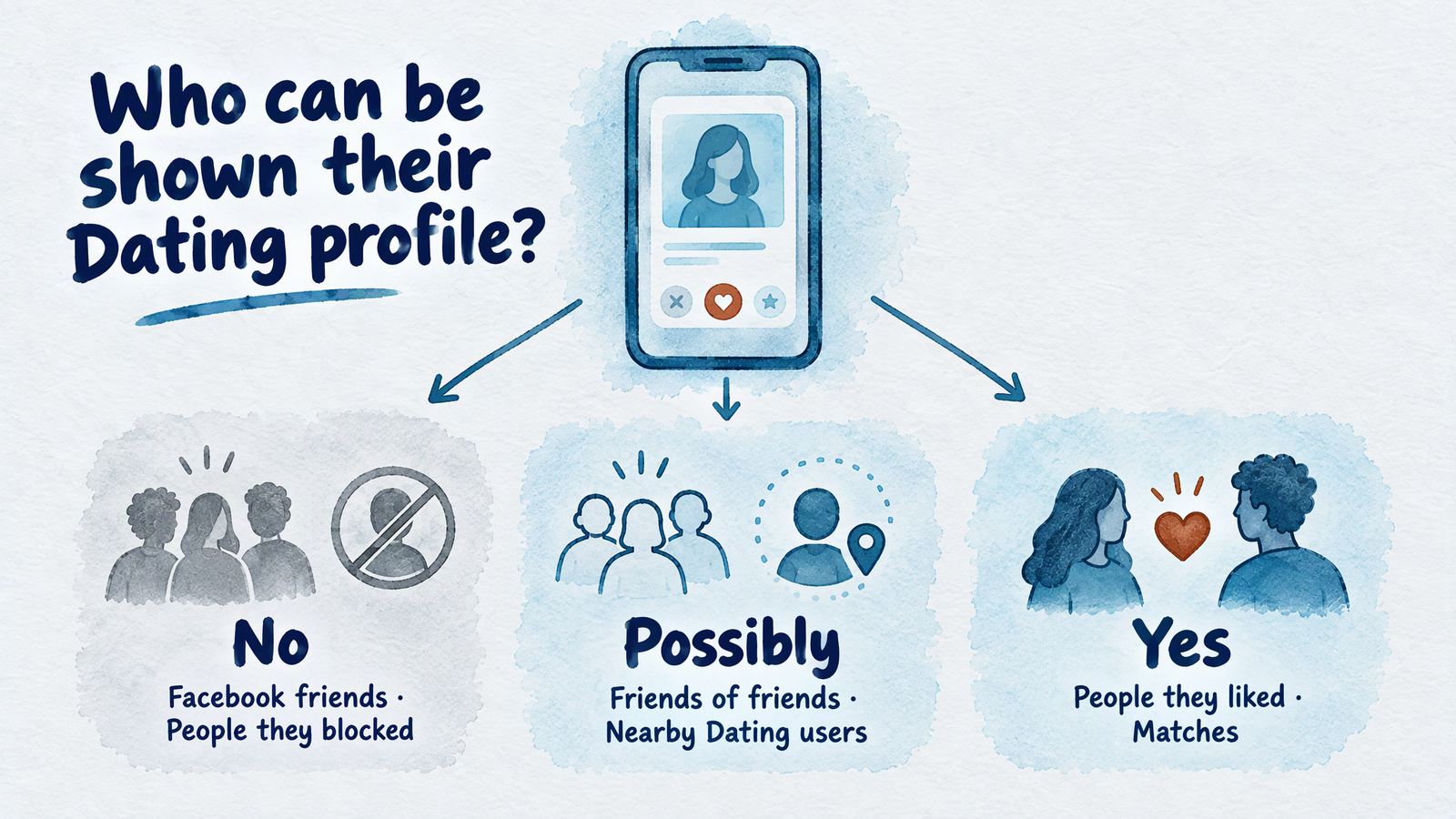
Facebook’s rules put the people closest to your partner in the group that can never see their Dating profile.
Only a small group of people could ever be shown your partner’s Dating profile:
| Who | Could they be shown the profile? | What it depends on |
|---|---|---|
| Your partner’s current Facebook friends | No | Meta never suggests current friends as matches |
| You, if you’re Facebook friends | No | Same rule, even if you have your own Dating profile |
| Friends of their friends | Possibly | Your partner left “Suggest friends of friends” on, and both people’s age, gender, and distance settings fit |
| A Dating user nearby who isn’t connected to them | Possibly | Preferences and distance fit; it’s a suggestion, not a search |
| Someone they’ve blocked | No | Blocked profiles are hidden from Dating automatically |
| Someone they sent a like or crush to | Yes | The like appears in that person’s Liked You tab |
| A match they later add as a Facebook friend | Yes | Meta says matches can still see a Dating profile after becoming friends |
So the only friend who can help is someone who already uses Facebook Dating, lives in your partner’s area, fits their preferences, and isn’t their Facebook friend. Even then, not seeing the profile doesn’t mean there isn’t one. The feed is ranked and filtered, and one toggle hides your partner from friends of friends. Don’t ask anyone to open an account just to look for them.
What a Dating icon, tab, or notification really tells you
A Dating heart or shortcut in someone’s Facebook app doesn’t mean they have a profile. Facebook puts Dating in the main bottom navigation bar, and TechCrunch noted in November 2025 that it stays there “even if your relationship status is not set to single.” Meta’s own instructions say eligible users open Dating from the menu and only “from there” create a profile. The shortcut is there before any profile exists.
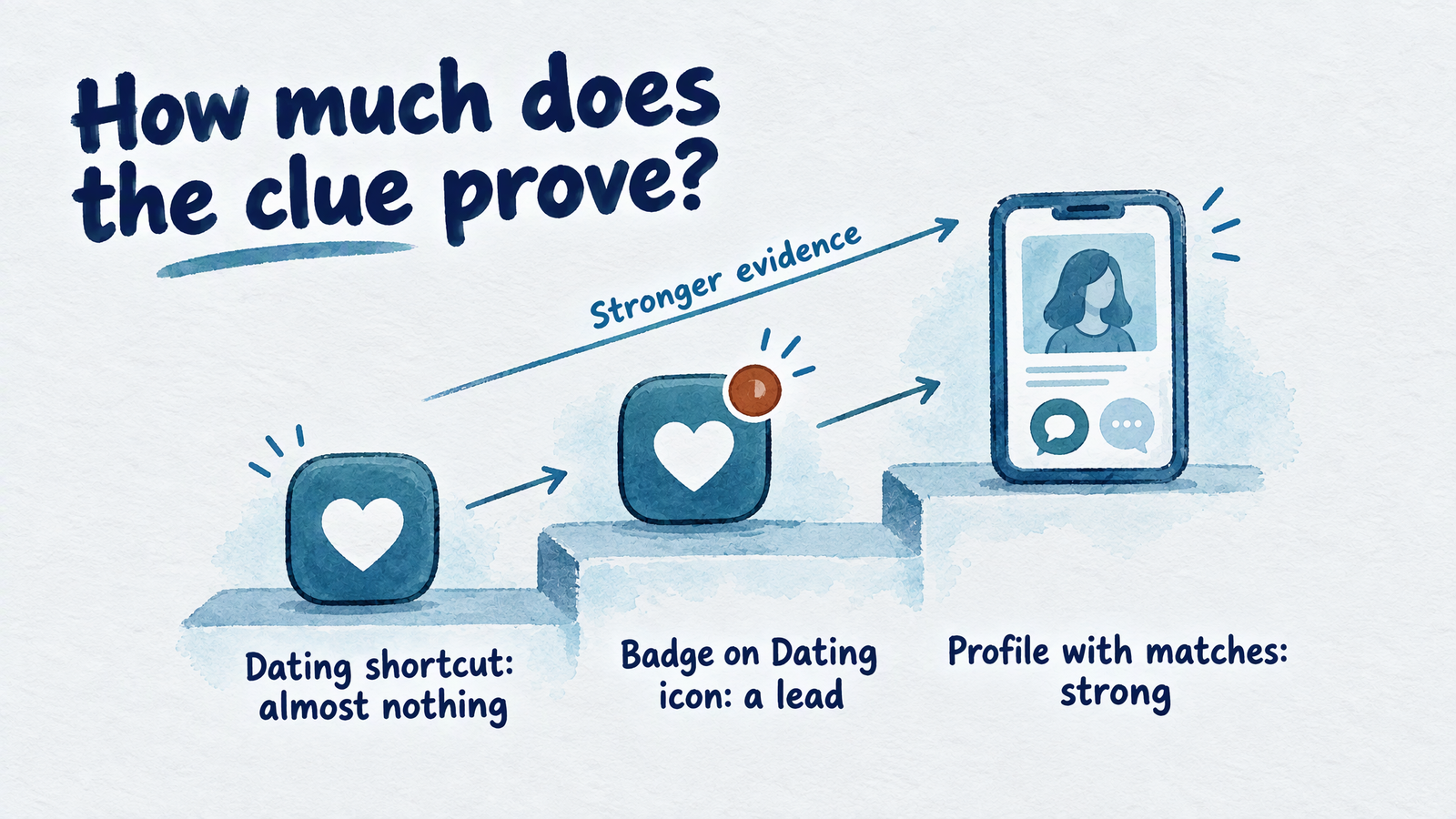
The Dating shortcut appears for eligible users by default, so it sits at the bottom of the evidence scale.
There’s also no “Dating tab” on anyone’s main Facebook profile. Meta says it won’t share dating activity to a Facebook profile or News Feed. Older guides that tell you to look for a Dating tab or a “Recently Used Dating” badge are repeating claims traced to a 2021 test that Meta never documented as a feature.
Here’s what each common clue tells you:
| What you noticed | What it means | How much it tells you |
|---|---|---|
| Heart icon or Dating shortcut in their app | Facebook shows it to eligible users by default | Almost nothing |
| A “try Dating” prompt or a general notification | Promotion, or a like from someone else | Little |
| A number badge on the Dating icon itself | Often likes or messages waiting on an existing profile, though users report exceptions | A lead worth following |
| They choose to open Dating and you see a setup screen | Usually no current profile (a deleted one leaves nothing) | Reassuring for now |
| They choose to open Dating and you see a profile, matches, or chats | They have a Dating profile | The answer. Note how recently it was used |
| “Active now” on Facebook or Messenger | Facebook or Messenger is open | Nothing about Dating |
| A guarded phone, new passcode, late-night scrolling | Something has changed | A reason to talk |
If you’re tempted to send them a crush to see what happens, read the fine print first. Meta’s current help page on sending crushes in Facebook Dating says the person “will be able to see that you liked them in Dating.” You’d need your own Dating profile, your partner would see that the like came from you, and silence wouldn’t tell you anything.
Lawful checks that can actually work
The checks worth doing use what’s openly visible or freely offered: a direct conversation, their public photos, a friend outside their Facebook circle, and a photo-matched search. Anything that needs their passcode, their password, or a fake identity crosses a line. Our guide to what’s legal when checking a partner’s apps explains where that line sits.
- Ask them, and ask to see it. “Are you on Facebook Dating?” is a fair question. If they offer to open Dating in front of you, a setup screen means there’s no current profile, and a profile with matches or chats answers the question. A deleted profile leaves nothing to show, so this only tells you about now.
- Reverse image search their public photos. Run Google Lens or TinEye on photos they’ve posted publicly. Facebook Dating profiles aren’t on the open web, so this won’t find the Dating profile itself, but it can turn up accounts you didn’t know about. Our explainer on searching dating sites by photo covers what these tools can and can’t reach.
- Ask the right friend. The only friend Facebook might show them to is one who already uses Dating, lives near your partner, and isn’t their Facebook friend.
- Check shared statements, but don’t expect much. Meta describes Dating as “a free dating experience within the Facebook app,” so unlike paid tiers on other apps, it won’t leave a subscription charge. Only look at accounts that are yours or joint.
- Run a photo-matched search. CheaterBusting compares one clear photo and the city they live or work in against publicly visible Facebook Dating profiles. Face matching plus a human check vets every profile we find. Facebook Dating is included in the Complete search, not the Essential one. Details are on our Facebook Dating profile search page.
To compare these with checks for other apps side by side, see seven lawful ways to check if your partner is on dating apps or our rundown of free dating-app checks and where each one stops.
What not to do
- Don’t unlock their phone or log in to their Facebook. Knowing a password isn’t permission. Federal laws such as the Computer Fraud and Abuse Act and the Stored Communications Act cover unauthorized access to accounts and devices, and state laws add more.
- Don’t make a fake profile. Meta’s Terms of Service require people to use the name they use in everyday life and to create only one account, their own. A brand-new account can’t use Dating for 30 days anyway.
- Don’t install monitoring apps. Secretly putting tracking software on another adult’s phone can bring wiretap and stalking laws into play. It also tends to turn the conversation into one about what you did.
What you can’t see without a Facebook Dating account
Without an account you can see nothing. Facebook Dating has no web version, no public profile pages, and no guest mode. Even with an account, you only see the suggestions Facebook chooses to show you. Every Dating user needs a Facebook account at least 30 days old, the Facebook mobile app, and their own Dating profile carrying their real first name and age.
That also tells you what to make of any site that claims to look someone up on Facebook Dating by name, email, or phone number. Meta offers no such lookup. Ask any service exactly which apps it checks, what it matches on, and what happens if nothing is found. Our checklist of questions to ask before you pay for a profile search lists the terms to look for.
What a Facebook Dating profile you find tells you
A Facebook Dating profile you or a friend comes across with their face on it is theirs. It also tells you how recently they’ve used it. Three facts help you read it.
Removing the shortcut doesn’t delete the profile. Deleting happens inside Dating’s own settings. According to Meta’s page on deleting a Dating profile, deletion erases Dating answers, likes, matches, and conversations, though matches can still see past chats. The person then has to wait 7 days before making a new profile. Deleting the whole Facebook account also deletes the Dating profile. So if they say “I got rid of that” and the profile still shows, they hid an icon and kept the profile. Our guide on a profile that still shows after they said they deleted it covers the same gap on Tinder.
Location tells you where they’re dating. Matching depends on a Primary Dating location that the phone’s Location Services must verify. Meta says that if a user’s Dating location doesn’t match where they actually are, they can keep messaging existing matches but can’t get new ones. A profile set to the city they live in now is one that can still get new matches.
Their face and details settle who it is. Only first name and age come over from Facebook, so the name alone won’t tell you. The face will. Photos you recognize plus details like job, height, hometown, or kids make it their profile. Anything that dates the photos, such as a haircut or a place you know they visited recently, shows how current it is.
If you find their profile
Write down what you saw, note how recent it is, and choose your moment to talk rather than confronting them in the heat of the moment.
- Record what you lawfully saw. Note the date, the city shown, and which details matched. Keep any screenshot from your own device, or one a friend took on their own account.
- Note how recent it is. New photos, a current city, or a job they only started this year show a profile in use now. Those details are your answer if they say they haven’t touched it in ages.
- Lead with what you saw. “A Facebook Dating profile with your photos and your current job showed up last week. Can we talk about it?” leaves room for the truth.
- Keep it private. Don’t post it, message their matches, or tell mutual friends first. Exposing someone tends to hurt you too.
- Get support. A couples counselor or an individual therapist can help either way. If you ever feel unsafe with your partner, the National Domestic Violence Hotline is free and confidential at 1-800-799-7233.
How CheaterBusting checks Facebook Dating
Facebook Dating is covered only by CheaterBusting’s Complete search, which checks all 12 named apps for $169, paid once. The Essential search ($119) covers Tinder, Bumble, Hinge, and Badoo, not Facebook Dating.
- What you give us: one clear photo and the city where they live or work. Their name and age help rule out look-alikes.
- What you get: every matching profile with its photos, profile link, the details that match, and how recently it was active. Face matching plus a human check vets each one, so a match is the person.
- When: within 7 days, or 1 day with Express delivery (+$50). You see the guaranteed date before paying, and if the report is late you get a full refund. A 30-day re-scan (+$50) checks every app again a month later.
- The fine print: otherwise payments are final, including when nothing is found. Only publicly visible profiles are checked. We don’t search by phone number, email, or username.
- Privacy: we never ask for passwords, touch their phone or accounts, read messages, or contact the person you’re checking. Billing uses a discreet name. Here’s what happens to the photo you upload.
CheaterBusting is independent and not affiliated with Meta or any dating app. An empty report means no matching profile was live on the apps we checked at the time of the search.
If the free checks have left you with a lead but no answer, start a private Facebook Dating search and get a written result by a date you see in advance.
Frequently asked questions
Is Facebook Dating still a thing in 2026?
Yes. Meta reported 21.5 million daily active users across 52 countries in November 2025 and added an AI dating assistant and weekly Meet Cute matches that September. In July 2026, Meta promoted its free Facebook Verified selfie badge for people considering meeting someone from Facebook Dating. Dating remains free inside the Facebook app for Android and iPhone, for users 18 and older in supported countries, including the US.
Can anyone see if I’m using Facebook Dating?
Your current Facebook friends can’t see your Dating profile, and Dating activity doesn’t appear on your Facebook profile or in Feed. People who can see it include Dating users you’re suggested to, friends of friends unless you turn that setting off, anyone you send a like or crush to, and matches you later add as Facebook friends. Anyone you’ve blocked on Facebook is blocked in Dating too.
Can you browse Facebook Dating anonymously?
No. Meta documents no guest or hidden browsing mode. To see any Dating profiles, you need a Facebook account at least 30 days old, the Facebook mobile app, and your own Dating profile, which automatically shows your real first name and age. You can limit who sees you by blocking people and turning off friends-of-friends suggestions, but people you’re suggested to can still see your profile.
Why does someone’s Facebook say active now but no green dot?
According to Meta’s help page on active status, Facebook and Messenger have separate active status settings, so someone can appear active in one place and not the other. If you’ve turned off your own active status, you won’t see other people’s. Status can also lag. Either way, “active now” only means the app is open, and it tells you nothing about Facebook Dating.
Your private results
Pick your search. Pay once. Stop wondering.
Every package checks the apps you pick with the same photo, age, and location matching, and ends with clear results delivered by a guaranteed date.
- Photo, name, age, and city matched together
- Every photo and the link to each profile we find
- Every app we checked, listed in your results
- Your results by a guaranteed date, or a full refund
- They’re never contacted. Discreet billing name.
From $119 for 4 apps$239
8 more apps for $50 more · Paid once · results in 7 days, or 1 with Express
Continue reading
Related evidence guides
How to Tell if Someone Is Active on Hinge: What 'Active Now' and 'Active Today' Really Show
Learn what Hinge's 'Active Now' and 'Active Today' labels really show, where they appear, why no label proves nothing, and what to do next.
Is My Wife on Tinder? How to Check Discreetly and Read What You Find
Is my wife on Tinder? Learn the lawful checks that work, what the green dot and Passport really show, and how to read a profile before you talk.
How to check dating apps without creating an account
Want to check dating apps without joining them? See what works with no account, where free checks stop, and the risks of making your own profile.

Before you say anything to them,
have it in writing.
Two minutes. One payment. Private results by a guaranteed date, and we never contact them.
Private & anonymous. We never contact them — your details are never sold, and nothing about them goes to advertisers.